Tempo Studio Teardown
A Tempo Studio hides a full PC and an Azure Kinect. Wiping it for Ubuntu took an evening. Getting it to hear my kids took all seven of its microphones.
Our Tempo Studio, a 42-inch fitness mirror that had sat unused since COVID, is now the family hub by our kitchen. It shows everyone's calendars and the weather, opens your profile when it recognizes your face, plays family photos when the room is empty, and answers "Magic Mirror on the wall" with the spirit, a talking face that rises out of smoke. Building a Magic Mirror shows what it does for the family. Underneath is the Tempo's own small PC on a fresh Ubuntu install, with speech recognition, the spirit's voice and face recognition all running on the mirror itself. The hard part was getting it to hear a kid across the room.
Inside a Tempo Studio
Inside the cabinet, a Tempo Studio is a small-form-factor PC with a big touchscreen and a Microsoft Azure Kinect attached by USB. Tempo used the Kinect to count your reps and check your form. Its depth camera floods the room with modulated infrared light and measures how far out of phase the reflection comes back, which gives it the distance to everything in front of it. The Kinect's color camera shows up as an ordinary webcam, so a web page can use it with no special software.
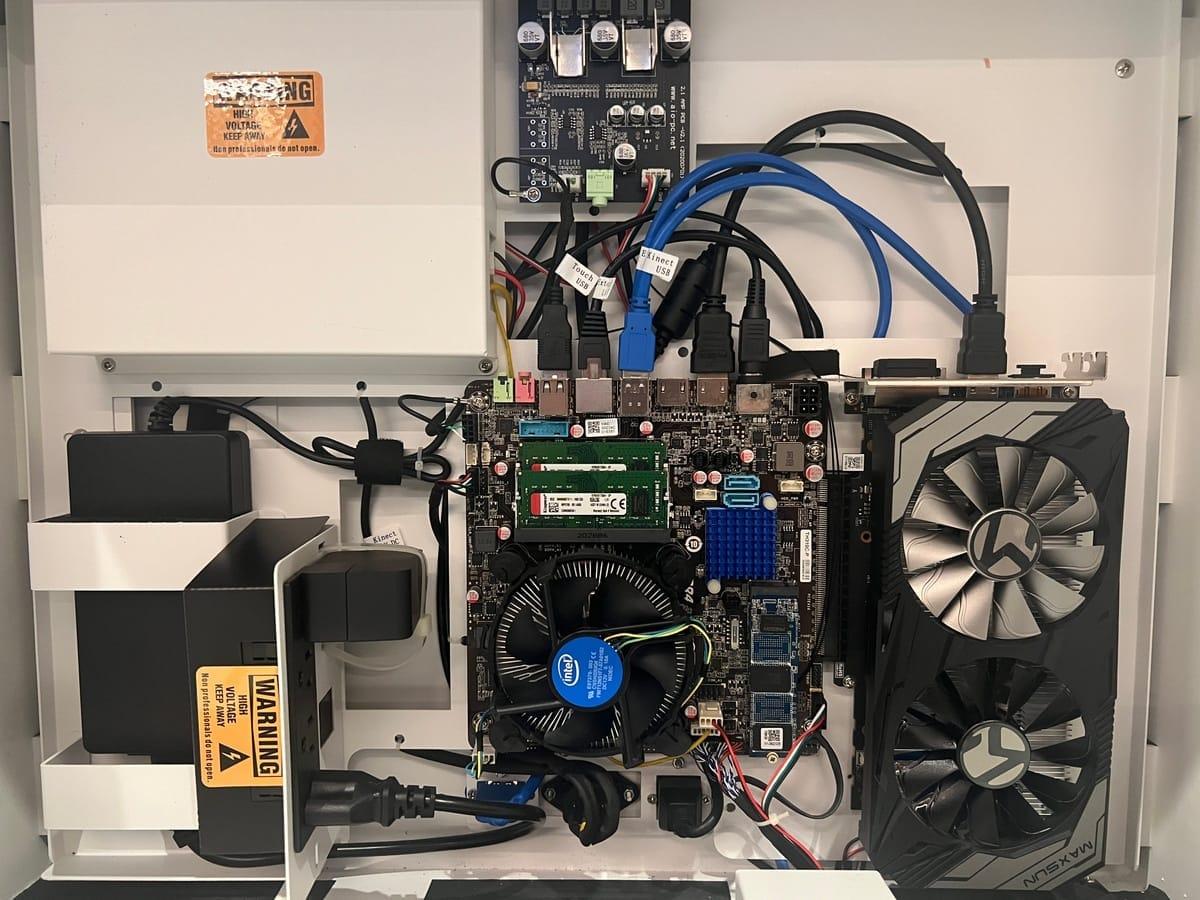
| Part | What's inside |
|---|---|
| Processor | Intel Core i5-9400F, 6 cores |
| Graphics | Nvidia GeForce GTX 1650, 4 GB |
| Memory | 8 GB DDR4, both slots full |
| Storage | one M.2 2280 NVMe drive |
| Screen | 42-inch touchscreen, 1920×1080, mounted portrait |
| Kinect | 4K color camera, depth camera, seven microphones, motion sensor |
The specs I found online listed a 10th-gen i5, a GTX 1050 Ti and 16 GB of memory. Mine has none of those, and the graphics card mattered: Nvidia's 580 driver is the last one that supports the 1050 Ti, while the 1650 runs the current driver. Run lscpu and nvidia-smi before you plan around anyone's spec sheet, mine included.
All it took was a new SSD, a fresh install of Ubuntu, and Claude. Once SSH was on, Claude connected from my Mac and went to town for the evening. My job shrank to standing at the mirror and tapping the corners of the screen when it asked. Most of the install is a standard Ubuntu setup, with a few traps specific to the Tempo.
-
Swap the SSD and keep the old one. It's a standard M.2 2280 NVMe drive. 500 GB is plenty. The original drive is your way back to a stock Tempo.
-
Plug the USB stick and keyboard straight into the motherboard. Through the Tempo's USB extension cable, the installer stopped with "No medium found."
-
Install Ubuntu 24.04 LTS Desktop. People have the Kinect's camera and mics working on 24.04, and I found no reports for 26.04.
-
Switch the desktop to Wayland. Ubuntu's
61-gdm.rulesstarts X11 on Nvidia's driver. Under X11 the app got each tap about 150 ms late, after a quick tap had already lifted, so a button couldn't show it was pressed until the finger came off. Set the session through AccountsService, since editing its file by hand didn't take:sudo busctl call org.freedesktop.Accounts /org/freedesktop/Accounts/User$(id -u) \ org.freedesktop.Accounts.User SetSession s ubuntu-wayland sudo systemctl restart gdmWayland calls the HDMI output
HDMI-1where X11 called itHDMI-0. Copy the portrait entry in~/.config/monitors.xmlunder the new name before the restart, and the screen comes up portrait without the "Keep these display settings?" prompt. Withnvidia_drm modeset=Yalready on, no reboot is needed.
-
-
Pick "Ubuntu (safe graphics)" if the installer looks scrambled. The open-source Nvidia driver garbles the installer window. Tick "Install third-party software" so Nvidia's own driver comes with the install.
-
Skip disk encryption and turn on automatic login. Ubuntu's standard encryption asks for a passphrase at every boot, and nobody is there to type it.
-
Turn on SSH, with passwordless sudo for the agent. Ubuntu Desktop ships without an SSH server, and an agent can't type a sudo password. On the mirror:
sudo apt install -y openssh-server
sudo systemctl enable --now ssh
Then from your laptop:
ssh-copy-id <user>@<mirror-ip>
ssh -t <user>@<mirror-ip> 'echo "<user> ALL=(ALL) NOPASSWD:ALL" | sudo tee /etc/sudoers.d/90-<user>-nopasswd && sudo chmod 440 /etc/sudoers.d/90-<user>-nopasswd'
Passwordless sudo gives root to anyone holding that key. Delete the file once you no longer need it.
-
Rotate the touch along with the screen. GNOME turned the picture to portrait and left the touch input sideways. A udev rule that matches the touch controller's USB IDs (from
lsusb; the Tempo's ILITEK panel is222a:0001) gives both of its input nodes the calibration matrix:# /etc/udev/rules.d/99-tempo-touch-rotate.rules ACTION=="add|change", SUBSYSTEM=="input", KERNEL=="event*", ATTRS{idVendor}=="222a", ATTRS{idProduct}=="0001", ENV{LIBINPUT_CALIBRATION_MATRIX}="0 -1 1 1 0 0"Load it with
sudo udevadm control --reload-rules, then reboot so the touchscreen is added again with the new matrix. -
Reserve the mirror's address on your router. Wi-Fi and Ethernet have different hardware addresses, so the mirror got a new IP when I moved it from a cable to Wi-Fi.
Everything runs on the mirror
The app is a web page running full screen in Chrome, backed by a small Python server (FastAPI) on the same box. Every model runs on the mirror itself: speech recognition (Vosk, with the vosk-model-en-us-0.22-lgraph model), the spirit's voice (Piper) and face recognition (InsightFace's small models). Nothing the mirror sees or hears leaves the house. Only the weather (Open-Meteo, no account needed) and the calendars come in from outside.
The phone admin
Settings live in a small admin app the family opens on their phones. It only answers on the home Wi-Fi, over HTTPS, behind a family PIN. From it we add family members (a name, an emoji and a color), enroll faces, paste calendar links, write notes and countdowns, and upload photos. The phone shrinks each photo to fit the screen and strips its location data before sending it.
Calendars come from Google Calendar's "secret address in iCal format," a private link to a read-only copy of a calendar. Anyone holding the link can read the calendar, so the admin app stores it on the mirror and never shows it again.
Faces
A parent starts enrollment from the phone. The person stands about a meter from the mirror and looks at it until a progress bar fills, turning their head a little as it goes. Each frame becomes an embedding, a list of numbers that works like a fingerprint for a face; the mirror keeps the numbers and throws the pictures away. Backups strip the face data, so it never leaves the device.
To recognize you, the mirror finds the biggest face in view, computes its embedding and compares it with everyone enrolled. It opens a profile only when three frames in a row agree and the best match is clearly ahead of the runner-up. On the Tempo's processor, finding a face takes about 30 ms and computing the embedding about 13 ms.
Faces need light on them. With the room lights off, the color camera can't see anyone, so walking past in the dark won't wake the screen (a tap still does). Backlit faces fail too: with only the lights behind someone, recognition missed until the room lights came on. The depth camera carries its own infrared light and could see in the dark; whether that's worth wiring up is still an open question. I haven't measured accuracy across the whole family yet.
The magic mirror
A visit starts with colored smoke swirling up the glass. The spirit's face appears in it, greets whoever's standing in front by name, and tells a riddle, a joke, a fun fact or some encouragement, speaking each line as it shows it. Tap anywhere and it leaves. The voice is generated on the mirror for each visit, so any new riddle I add gets spoken with no extra step. It's Piper with a British voice, which I lowered two semitones and slowed by 30% until it sounded right to me. Piper has no pitch setting, so the mirror labels each WAV with a slower sample rate, which plays the same samples lower and longer, and Piper's length_scale covers the rest of the slowdown.
The smoke is a WebGL fluid simulation running on the graphics card. Four vents at the bottom push buoyant smoke upward, the plumes curl around each other, and the face is a solid the smoke has to flow around.
Effects like this get tuned by eye, so Claude builds a throwaway lab page for each one, with a control for every setting. Once the smoke looked right in the lab, its values went into the app.
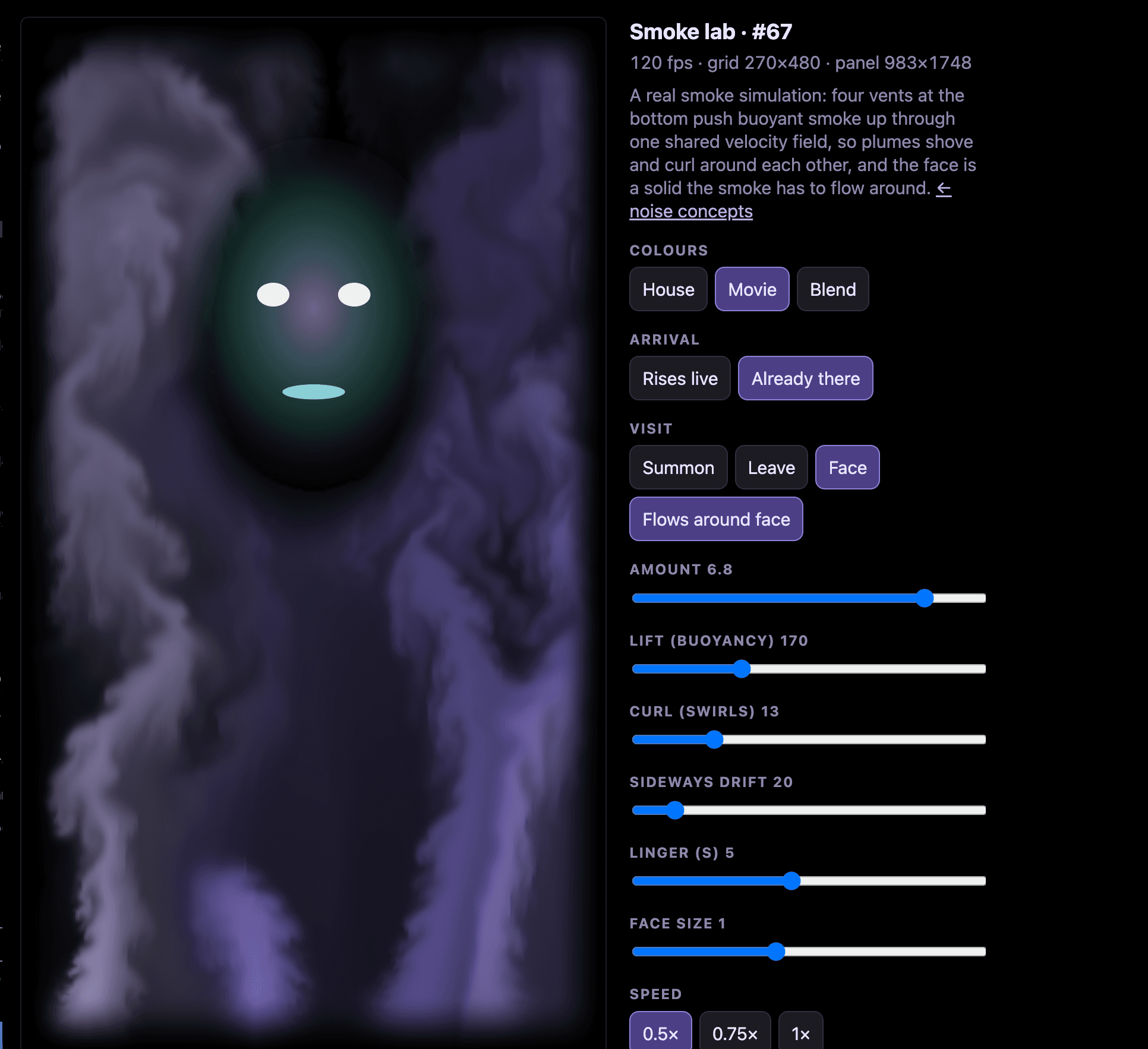
In the lab, the face is Claude's stand-in, an oval with two eyes. For the real one I found a 3D model on Sketchfab by peedr0o0, shared under CC BY 4.0 and modified for the mirror. The Kinect finds your eyes, and the face is drawn as if the glass were a window, so it turns to look at you and follows you as you walk around, which keeps the kids playing at the mirror longer. Since the model came with no moving jaw, Claude gave it one: the bottom of the face drops in time with how loud the voice is.
Hearing a kid across the room
The spirit was the kids' idea, and its wake phrase, "mirror mirror on the wall," worked every time for me. For the kids, it did nothing at all.
The first theory was pronunciation: my kids say "mirror mirror" as "miwa miwa," two soft syllables with the R missing. Claude added a log for near misses: whenever the mirror heard "mirror mirror" and nothing matched, it wrote down the words it heard and how confident it was in each. The kids tried again, and the log stayed empty: their tries never produced "mirror mirror," so the case that mattered left no trace.
Next I wanted to see what the mirror thought it heard, so Claude added a second recognizer that transcribes everything. Its transcripts were nonsense ("octopus" came out as "article, hot pepper"), and running two recognizers slowed the first one enough to drop words. I swapped the small speech model for a bigger one.
Then I recorded the kids on my phone. Fed to the recognizer on my laptop, both models matched the phrase, with every word's confidence between 0.93 and 1.00. The unrestricted transcript of the same clip read "male male on the wow," and the phrase matched anyway. The difference was the mirror's microphone.
The app had asked for a single channel of audio, and Linux satisfied it by picking one of the Kinect's seven microphones. Recorded at that one mic, a kid's voice peaked only about 15 decibels above the room's background. Turning the volume up didn't help, because it turned the background up too: at 1×, 4× and 16×, the mirror caught "on the wall" and lost the "mirror mirror" at the start.
Recording all seven mics, averaging them and boosting the result 16 times produced the first match on a kid's voice. All seven mics hear the same voice, while part of the noise differs from one mic to the next, so averaging keeps the voice and evens out some of the noise.
The capture is one pw-record call against the Kinect's PipeWire node, which pw-dump lists as a 7-channel source with Azure_Kinect_Microphone_Array in its name. Pass --target explicitly: without it, pw-record silently records the default source instead.
pw-record --target <kinect-node> --rate 16000 --channels 7 \
  --channel-map AUX0,AUX1,AUX2,AUX3,AUX4,AUX5,AUX6 --format s16 -
The mix down to the recognizer's mono audio averages each frame across the seven channels, applies the gain and clamps to 16 bits, so loud speech clips instead of wrapping around:
from array import array

def downmix(pcm: bytes, channels: int = 7, gain: float = 16.0) -> bytes:
    samples = array("h", pcm)  # interleaved s16le frames
    frames = zip(*(samples[c::channels] for c in range(channels)))
    mixed = (max(-32768, min(32767, int(sum(f) * gain / channels))) for f in frames)
    return array("h", mixed).tobytes()
I changed the words too. "Magic" doesn't lean on the R sound the kids drop, so it survives their speech where "miwa miwa" didn't. The mirror also hears "magic marker" as "magic mirror," so no command is just those two words.
Kids' tries still tend to lose a word. The log caught "the magic on the wall" and "magic mirror on the the." Accepting the phrase with any one word after "magic" missing took one kid's six tries from one match to three. "Magic" itself stays required, because without it the mirror squeezes everyday speech into a command: "Miranda, wash your hands" comes out as "mirror on the wall."
These days the spirit answers the kids about 80% of the time. Every theory I tested on my own voice or a computer voice was wrong. One recording of a kid, through the mirror's own microphone, settled it.
Sharing one small PC
The camera, three local models, a WebGL smoke simulation and a 3D face all share the Tempo's one small PC, so I decided how much of the machine each one gets. Face detection checks the camera every 400 ms and speeds up to every 100 ms only while the spirit is on screen, so the spirit's face can follow you. The spirit's voice stays loaded in about half a gigabyte of memory, so its first line starts without a pause. During a visit, the smoke and the face hold 45 to 49 frames per second, with the graphics card about a quarter busy and Chrome using less than one core.